Shift Planner
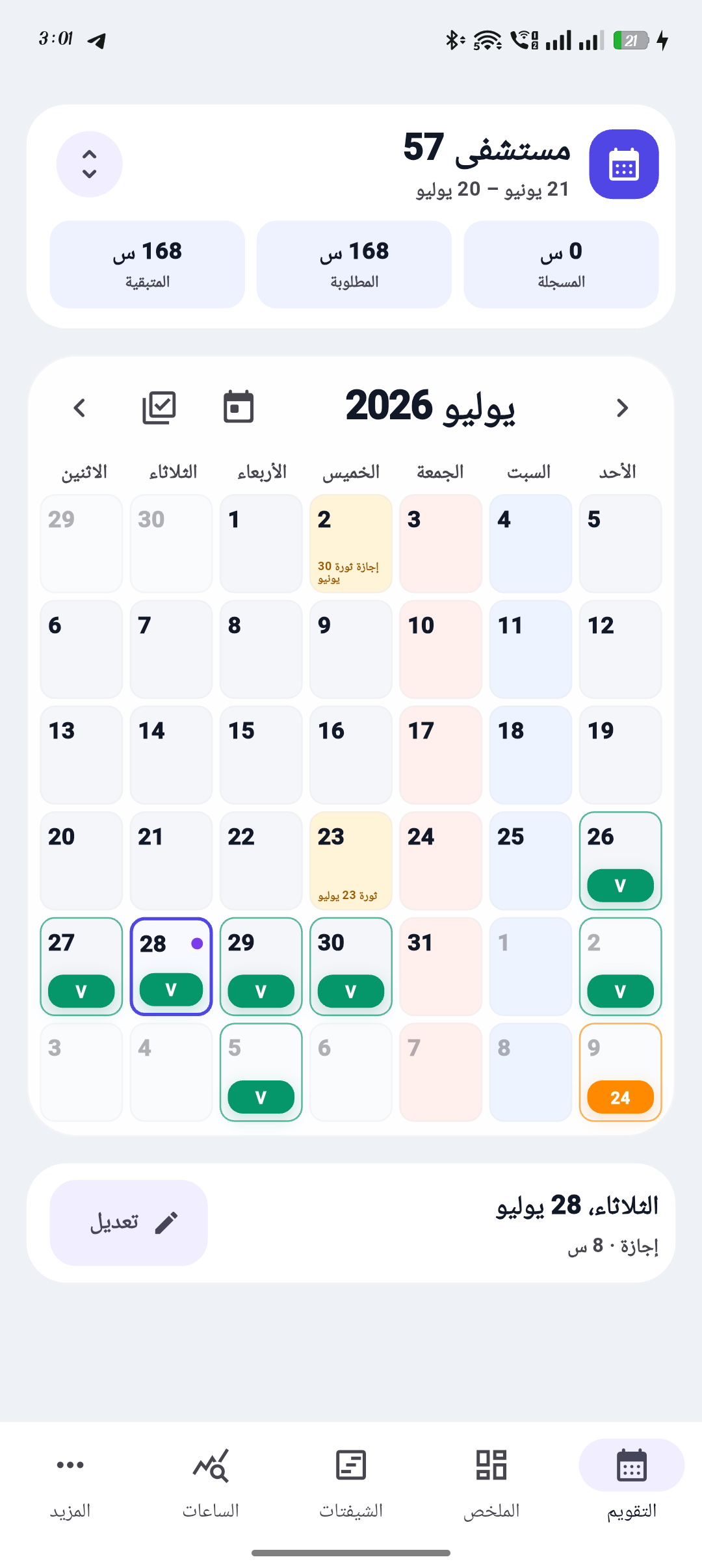
Calendar

Your roster

Roster period
Working shifts0
Scheduled hours0 h
Remaining hours0 h
Tap a day to add a shift
Dashboard

Everything at a glance

Your roster, hours, shifts and leave in one simple view.

Current roster
0hscheduled of target

Shift mix

Count of every saved shift in this period.

Leave & Off

A quick view of non-working entries.

Upcoming shifts

The next saved entries in this roster.

Weekends & holidays

Automatic reference for the current calculation period.

Shift settings

Your shift types

Add, edit or remove the options you use.

Available shifts

These appear when you tap a day.

Reports

Month summary

Hours and shifts for the selected roster.

Calculation period

Your roster status

Saved shifts, exact hours and what remains in one place.

Saved work shifts0
Scheduled hours0 h
Remaining hours0 h
Saved shift mix
Standalone shift calculatorEnter any monthly target and shift duration without adding shifts to the calendar.Each leave day = 8h
Quick values
Month
Shift
Full shifts needed
15 shifts
Hours after leave184 h
Leave deduction0 h


Weekends & official holidaysDetails behind the required hours: weekends and official holidays are deducted automatically.Calculation details
FridaySaturdayOfficial holiday
2026 follows the published official calendar. Dates for 2027–2028 are planning estimates and can be edited after government decisions are issued.

Shift breakdown

Your period at a glance.

Weekly statistics

Compare hours by week and see every shift count.

More

Rosters & settings

Keep a separate calendar for every workplace.

Shift Planner for Android

Use your roster on Android.

Get Shift Planner on Google Play for roster tools, optional shift reminders and the home-screen widget. Android and web data are stored separately.
Calendar firstWorks offlineNo sign-inArabic & English
◐

Appearance

Choose light or dark mode.

ع

Language

Use the app in Arabic or English.

↧

Backup & transfer

Download your rosters before changing phones or website address.

+

Install on your phone

Add Shift Planner to your home screen for faster access and offline use.

Your rosters

Hospital, clinic, ward or any workplace.

Everything is saved on this device automatically. Each roster keeps its own calendar and report. No sign-in is required.
How to use Shift Planner
1Choose your rosterTap the roster name at the top to add or switch workplaces.
2Add a shiftTap a calendar day, choose the shift, check details and save.
3Check hoursOpen Hours to set the period target and review calculations.
4Keep a backupDownload a backup before changing phones or clearing browser data.
Implementation & supportMohamed El MoatazFor suggestions and technical support
Web version 2.1 · Updated 1 October 2026
Add shift
Choose a shift
Check the details
Choose a shift to fill its details.
Repeat automatically
New shift type
Create exactly the option you need.
New roster
Name it after a hospital, clinic or workplace.
Choose roster
Each roster has its own calendar.
Schedule tools
Build the next roster faster.
Shift actions
Repeat shift
Print or share roster
Choose the exact month and calculation period before continuing.

To send the PDF file itself, choose Print / PDF, save it, then attach it in WhatsApp or email.

تثبيت Shift Planner كاختصار
📲 يعمل كأي تطبيق هاتف عادي: يفتح بملء الشاشة بدون شريط المتصفح، ويعمل بالكامل Offline بدون إنترنت!
🍏 لمستخدمي آيفون و iPad (Safari):
  1. اضغط زر المشاركة (Share) في شريط Safari السفلي.
  2. مرر للأسفل واختر إضافة إلى الشاشة الرئيسية (Add to Home Screen).
  3. اضغط إضافة (Add) في الأعلى.
🤖 لمستخدمي أندرويد وكمبيوتر (Chrome/Edge):
  1. اضغط على قائمة المتصفح (⋮).
  2. اختر تثبيت التطبيق (Install App) أو إضافة للشاشة الرئيسية.